
See how it works
Getting Started
Let’s install the add-on and unlock a faster, simpler way to manage tables, create clean PDFs, and enhance your workflow in Google Docs™, Google Slides™, and Google Sheets™.
Installation and Setup
Section titled “Installation and Setup”Follow these steps to get the Add-On ready to use in Google Docs™, Sheets™, Slides™, Forms™, Gmail™, Drive™, and Calendar™.
-
Install from Google Workspace Marketplace™
Install in under a minute
Get Text To Table Converter from Google Workspace Marketplace.
-
Launch the Add-On from the Side Panel Look for the add-on’s icon in the vertical panel on the right-hand side of your screen. Click on it to open the main interface.

The sidebar will open on the right.
Sidebar
Section titled “Sidebar”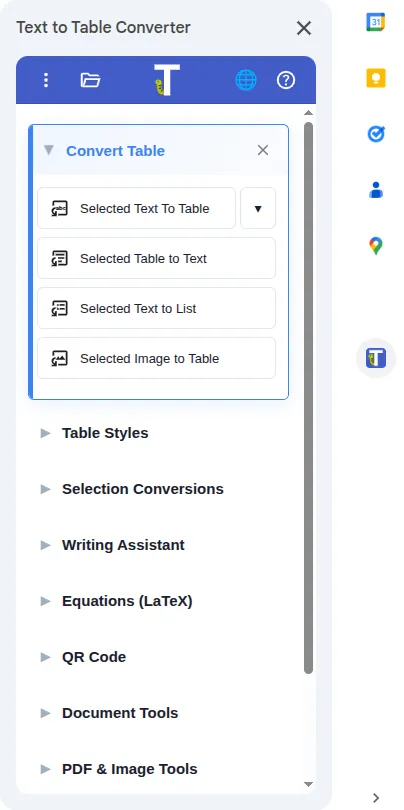
Explore Key Features
Section titled “Explore Key Features”Now that you’re set up, explore the core features of the Add-On with our detailed guides:
Convert & Format
Section titled “Convert & Format”These are the fundamental tools for converting data and styling tables.
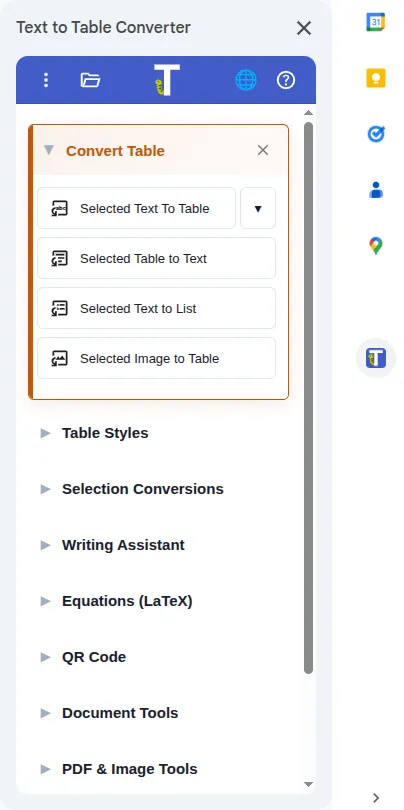
Selected Text to Table Transform structured (CSV), Markdown, or even messy, unstructured text into a clean table.
Selected Image to Table Extract table data from images using OCR technology and convert them into editable tables.
Selected Table to Text Extract data from any table into comma-separated text (CSV format).
Edit & Format Tables Open the table workspace to style tables and apply formatting updates.
Transform Selection
Section titled “Transform Selection”Instantly improve, translate, or summarize any selected text.
Translate Selection Instantly translate selected text or tables into dozens of languages.
Fix Grammar & Spelling Correct mistakes and improve the clarity of your writing with a single click.
Summarize & Shorten Create concise summaries or shorten text while preserving the original meaning.
AI Features
Section titled “AI Features”Use AI for writing and Sheets automation.
Writing Assistant Use AI to polish text, change its tone, draft emails, or create social media posts.
AI Agents (Sheets Only) Give natural-language instructions to update, format, and analyze selected ranges in Google Sheets™.
AI Sheet Formulas (Sheets Only) Use AIASK, AITAG, AITRANSLATE, AIVOCAB, AIPATTERN, AIDRAFT, AIMERGE, AISPLIT, AITABLE, and AIREVERSECALC directly in Google Sheets™ cells.
Tools and More
Section titled “Tools and More”Dive into advanced tools for document management, table manipulation, and professional LaTeX equations.
PDF & Image Tools Extract text and tables from PDFs and images (OCR) or organize pages by splitting and merging files.
Remove Image Background Remove backgrounds from images and insert clean PNG cutouts into Docs, Sheets, or Slides.
Edit & Format Tables Open the table workspace to style tables and apply formatting updates.
Modify Table Quickly restructure your table by transposing, rotating, or automatically resizing rows and columns.
Equations (LaTeX) Create and edit professional mathematical and scientific equations with a powerful editor.
Document Tools Export clean PDFs without tab titles, merge multiple documents, and more.
QR Code Generate and insert QR codes into your documents.
Mega Tools
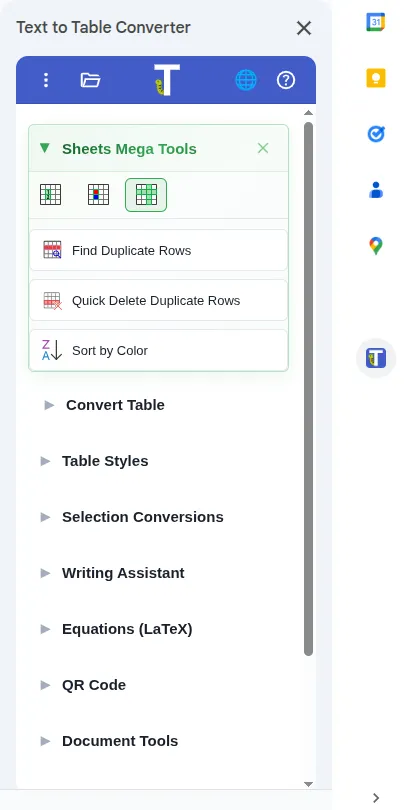
Section titled “Mega Tools”
Mega Tools
Essential tools for spreadsheet and data work in Google Sheets™. Explore three focused categories to search cell values, format data by rules, and manage rows and columns efficiently.


- Find Values in Cells
- Find Duplicate Cells
- Sum by Color
- Cell Value Heatmap
- Text Case Transform
- Smart Text Case ✨
- Find Duplicate Rows
- Sort by Color
Find Values in Cells Search by regex or substring, then highlight, replace, or format matches.
Find Duplicate Cells Locate cells with duplicate values within your selected range.
Sum by Color Calculate sums based on cell background colors.
Cell Value Heatmap Visualize data patterns by applying color gradients to cell values.
Text Case Transform Normalize capitalization across your selection with smart sentence and proper case options.
Smart Text Case ✨ AI-powered, context-aware capitalization for names, addresses, and messy input.
Find Duplicate Rows Identify rows that contain identical data across multiple columns.
Sort by Color Sort the current selection using cell background colors.
Need Help?
Section titled “Need Help?”Stuck on something or have a question? We’re here to help! Visit our Support page for direct assistance.
Get the Add-On
Section titled “Get the Add-On”Get the free add-on to start working faster in Google Docs™, Slides™, and Sheets™.

Install Text To Table Converter in minutes
Get the free add-on for Google Docs™, Slides™, and Sheets™ and start saving countless hours of work.